WordPress REST API Integration
This guide shows how to use OpenClaw Ultra to manage your WordPress site — publish posts, manage WooCommerce products, select categories, and fill hashtags — all through the WordPress REST API.
What You’ll Need
- A self-hosted WordPress site (wordpress.org, not wordpress.com)
- The Basic Auth plugin installed on your WordPress site
- OpenClaw Ultra installed on your Windows desktop
Step 1: Install the Basic Auth Plugin
WordPress REST API requires authentication. The easiest way is using the Basic Auth plugin.
- Download the plugin from: https://github.com/WP-API/Basic-Auth
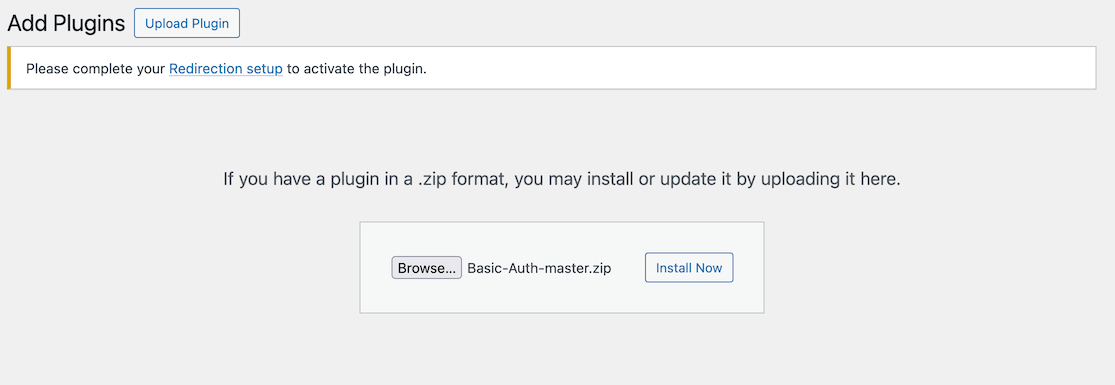
- In your WordPress admin panel, go to Plugins → Add New Plugin → Upload Plugin
- Upload the downloaded
Basic-Auth-master.zip file
- Click Activate
💡 Alternative Authentication
If your server supports OAuth or Application Passwords (WordPress 5.6+), you can use those instead. This guide uses Basic Auth for simplicity.
Step 2: Create a .env File for Credentials
Create a .env file in a secure location on your computer to store your WordPress site credentials.
Create a file named wordpress.env with the following content:
WP_SITE_URL=https://yoursite.com
WP_USERNAME=your-admin-username
WP_APPLICATION_PASSWORD=your-password
⚠️ Keep Your .env File Safe
Never commit your .env file to version control or share it publicly. Add *.env to your .gitignore file.
Step 3: Configure OpenClaw Ultra to Read the .env File
In OpenClaw Ultra, you can use the File skill to read your .env file and load the credentials.
- Open OpenClaw Ultra
- In the chat, type:
Read the file at C:\path\to\wordpress.env and store each line as a variable.
- OpenClaw Ultra will parse the
.env file and make the values available for subsequent requests.
Step 4: Publish a WordPress Post via REST API
Now you can use OpenClaw Ultra to create and publish WordPress posts automatically.
Example prompt:
Using the WordPress REST API at {WP_SITE_URL}/wp-json/wp/v2/posts,
create a new post with:
- Title: "My First Automated Post"
- Content: "This post was created by OpenClaw Ultra via the WordPress REST API."
- Status: publish
- Categories: Technology, AI
- Hashtags: #WordPress #Automation #OpenClaw

Use Basic Auth with username {WP_USERNAME} and password {WP_APPLICATION_PASSWORD}.
OpenClaw Ultra will send a POST request to the WordPress REST API endpoint and publish your post.
API Endpoints Reference
| Action | Endpoint | Method |
|---|
| Create post | /wp-json/wp/v2/posts | POST |
| Update post | /wp-json/wp/v2/posts/{id} | PUT |
| Get posts | /wp-json/wp/v2/posts | GET |
| Delete post | /wp-json/wp/v2/posts/{id} | DELETE |
—
Showing 5/10 sections. Full content: https://openclaw.aiondesktop.com/tutorials/9